
When you login to Fleetworks you will see your user Dashboard which is a list of Fleetworks partners who have agreed to send you instructions via Fleetworks.
Select the Fleetworks account you wish to manage by clicking the icon and you will be taken to a summary of all debts placed with you. You can then access each one via the edit icon.
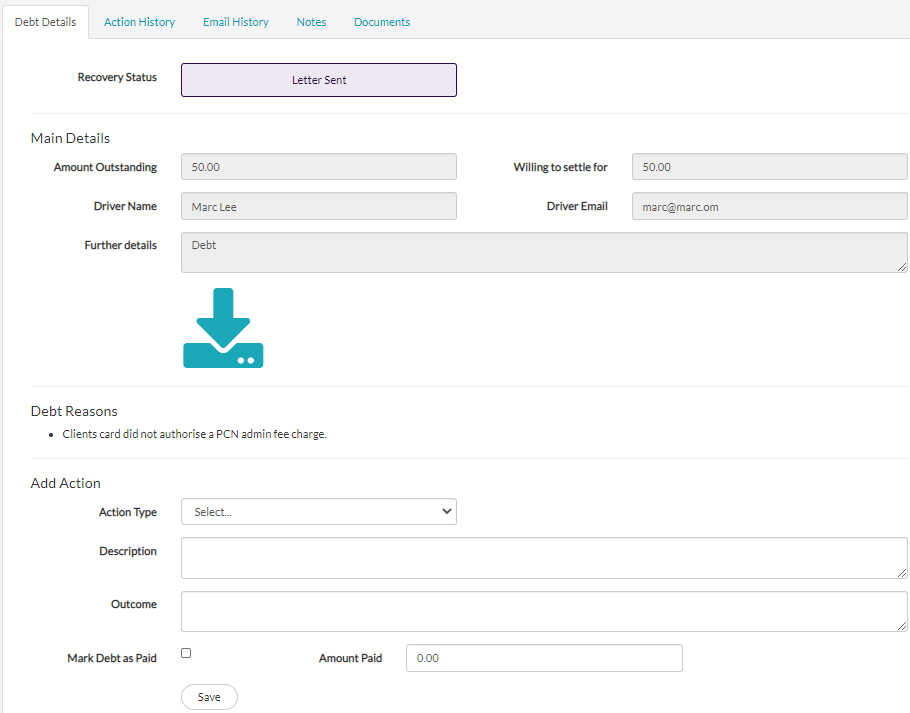
The main screen is divided into two parts. The first is the debt data sent to you from the Fleetworks user. The bottom half of the screen is for you to update the client with regard to your recovery action.
Any action you record here will be saved to the Action History tab and an email will be dispatched to the Fleetworks user with a summary.
The Email History tab will allow you to view any emails sent to the debtor prior to your involvement. For example, the Fleetworks user may have used the internal debt recovery process or sent their own emails via Fleetworks and these will be saved here. The date and time and status of these emails is available for you as well as the user who sent them.
You can add Notes to a case and the Fleetworks user will be able to view the note. Likewise, the user can add notes for you to review. Adding a note will generate an email to the Fleetworks user.
A Fleetworks user may want to cease action on a debt. In which case they might use the Cease Action button available on their login. This will notify you by email. This will not close access to the debt to allow you to update the system with any final notes or comments.
Fleetworks does not process payments between recovery agents or Fleetworks users. It will be up to you to make financial arrangements about payments.
Any work undertaken via Fleetworks is at your sole discretion and we cannot be held responsible for payment issues. Fleetworks will communicate commercial terms to the Fleetworks users and every time a user instructs a debt agent via Fleetworks they have to confirm they understand that fee’s may be incurred.